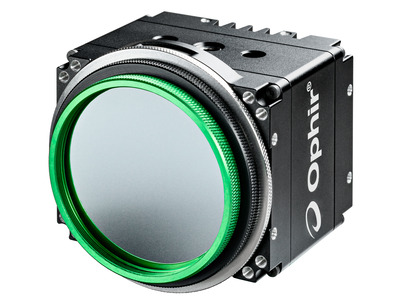
SP504S GigE 5120x5120 340-1100 nm Laser Beam Profiler
SP504S GigE 5120x5120 340-1100 nm Laser Beam Profiler
The SP504S camera accurately captures and analyzes wavelengths from 340 nm 1100nm. It is our largest active area at a 32.5 mm format, has a wide dynamic range, and unparalleled signal to noise ratio, making it ideal for beam profiling of very large beams.
- 23mm x 23mm imager format
- Highest resolution
- CMOS, Global shutter
- 44.6 dB true dynamic resolution 查看所有功能

Software
BeamGage Professional
BeamGage Professional has all of the functionality that BeamGage Standard includes. BeamGage Professional supports all of our beam profiling cameras, includes window partitioning to allow analysis of multiple beams on a single camera, and includes an automation interface written in .NET to push data to your custom applications.
规格
- 产品名称SP504S
- 光谱范围340-1100nm
- 光束尺寸45μm - 23mm
- 通信接口GigE
- 传感器类型CMOS, Global shutter
- 兼容的光源CW, Pulsed
- 有效面积23mm x 23mm
- 元件5120 x 5120
- 有效像素间距4.5μm
- 动态范围44.6 dB
- 全分辨率帧率4.5 fps (10 bit mode)
- CE 符合性Yes
- UKCA 符合性Yes
- 中国 RoHS 符合性Yes
常见问题
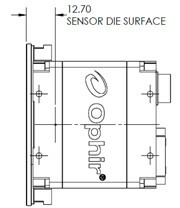
- What is the distance from the front of the camera to the sensor?答案
The distance from the front of the camera to the sensor is nominally 12.7mm, not including the SM2 adapter.
- At what wavelengths is the SP504S most responsive?答案
- What is the frame rate of the SP504S?答案
4.5 Frames/second
The effective frame rates listed in BeamGage specification sheets are the maximum rates typically achievable in actual use when in 2x2 binning mode. Frame buffering, image processing techniques, graphical displays, and mathematical computation all add degrees of overhead to achieving higher frame rates. This can be further limited by the available PC hardware. BeamGage features two modes, Frame Priority and Results Priority, which change how the system balances the work. Results Priority acquires a frame, performs any enabled image processing, performs all calculations and updates the graphical displays before accepting another frame from the camera. This mode is most useful when a temporal sequence of frames is not necessary and should always be enabled when logging. Frame Priority mode will allow the calculations and graphical display updates to be interrupted if another frame is ready from the camera before those operations are complete. This can be useful when collecting all frames at the maximum camera frame rate is necessary.
- What beam sizes can I measure with the SP504S?答案
45 µm – 23 mm
The accurate beam size minimum is derived by the pixel size of the camera. In order to get an accurate measurement, there must be enough coverage of pixels to ensure that illuminating another pixel will not over exaggerate the beam size.
- My laptop will not connect to the SP504S while connected to its docking station.答案
Many laptops disable the GigE port on the computer when docked. Try using the port on the docking station.
All GigE ports used to connect to the SP504S need to be configured according to the Ethernet Configuration for Ophir-Spiricon GigEVision Products document. - What is the saturation level of the SP504S camera?答案
The saturation intensity for the SP504S is 1.68 mW/cm² at 633nm.
- Why is the SP504S frame rate degrading over time?答案
If the SP504S is used on a NIC that is not properly configured or does not fully support Gigabit Ethernet speeds, over time the camera frame rate may degrade or stop altogether. Ensure that the NIC driver properties have been optimized according to the Ethernet Configuration for Ophir-Spiricon GigEVision Products document. If the degrading frame rates continue, the camera must be power cycled in order to restore operation.
配件
| 对比 | 型号 | 图纸、CAD和参数 | 库存 | 价格 | ||
|---|---|---|---|---|---|---|
 | 光学相机触发器 | |||||
 | LBS-100衰减器 中性密度滤光片和单光束光学取样系统的组合(激光功率高达~400W) | |||||
 | LBS-400衰减器 Pyrocam相机适用的中性密度滤光片和光学取样系统 |
资源
Drawings & CAD
SP504S Drawing(430.8 kB, PDF)
Data Sheets
Large Format USB & GigE Cameras Datasheet(369 kB, PDF) BeamGage Datasheet (647.6 kB, PDF)
Manuals
Getting Started with Gig-E Cameras User Notes(1.3 MB, PDF) BeamGage User Guide(7.3 MB, PDF) BeamGage User Guide - Japanese(6.3 MB, PDF) BeamGage User Guide - Chinese(7.3 MB, PDF) BeamGage User Guide - Chinese(7.3 MB, PDF)
Catalogs
Application Notes
Videos
1 Introduction to BeamGage Beam Profiling Camera(0:38) 2 Source Tab - Control Acquisition of Laser Data(7:42) 3 Beam Display Tab - Control Display Options(9:21) 4 Capture Tab - Customize Data Collection(7:46) 5 Computations Tab - Adjust Calculations(10:29) 6 Aperture Tab - Define Region of Interest(9:40) 7 BeamGage Charts, Logging and Reports(4:26) 8 BeamGage Setup Configuration(5:04) 9 BeamGage Beam Width Calculations(2:25) 10 BeamGage Ultracal and Apertures(5:35) 11 BeamGage Camera Resolution(4:15) 12 BeamGage Weak Beam Strategies(2:03) 13 BeamGage Tips and Tricks(4:41) 14 BeamGage Camera Setup Example(12:52) BeamGage Tutorial: Automation(10:29) BeamGage Tutorial: Beam Attenuation(4:25) BeamGage Tutorial: Camera Quick Start(3:41) BeamGage Tutorial: Getting Started with BeamGage(17:04) BeamGage Tutorial: Help System(3:28) BeamGage Tutorial: Power/Energy Measurement Integrated(5:44) BeamGage Tutorial: Spot Size and Divergence(7:52) BeamGage Tutorial: Tabs and Ribbons(13:23) BeamGage Tutorial: Ultracal(3:33)
Technical Notes
Integrated Solutions Using the built in photodiode trigger on the SP620U and SP503U cameras BeamGage Profiling with .Net Automation Interface and LabVIEW® The Focal Length Divergence Measurement Method BeamGage Professional Partitions with Multiple Beams on One Display Measurement of Mode Field Diameters of Tapered Fibers and Waveguides for Low Loss Components Beam Width Measurement Accuracy Understanding Dynamic Range…The Numbers Game
Technical Articles
LIDAR Guns, Accuracy, and Speeding Tickets VCSEL Measurement Solutions Imaging UV light with CCD Cameras Which Camera Technologies Work Best for Beam Profiling Applications, Part 2: Baseline Methods and Mode Effects Which Camera Technologies Work Best for Beam Profiling Applications