When aligning a complex optomechanical system, even a small mechanical adjustment can affect more than one beam parameter. Turning a knob, tightening a screw, or shifting focus may influence beam power, beam position, and overall pointing stability at the same time.
Ophir’s BeamTrack sensors are designed to help monitor these changes in a single workflow. Combined with StarLab software, they provide a practical way to track beam behavior more clearly during alignment, optimization, and troubleshooting.
Watch the video to learn how BeamTrack and StarLab help monitor beam pointing stability, power, and position in one workflow.
Why beam pointing stability matters
In many laser systems, power measurement alone is not enough. During alignment and optimization, it is also important to know whether the beam remains stable over time or drifts as the setup changes.
That is especially relevant in applications such as industrial systems integration, laser manufacturing, high-power beam divergence measurement, and alignment or boresighting workflows. In these environments, immediate feedback can make it easier to identify unwanted beam motion and correct it before it affects performance.
Measure multiple beam parameters together
One of BeamTrack’s main advantages is that it lets users monitor more than just power. BeamTrack sensors measure beam position along with power, and BeamTrack position-and-size models add beam size measurement as well.
This makes BeamTrack well suited for alignment tasks where several beam parameters need to be checked together rather than one at a time. Instead of switching between different tools or views, users can work with a more complete picture of beam behavior in a single setup.
Visualizing stability in StarLab
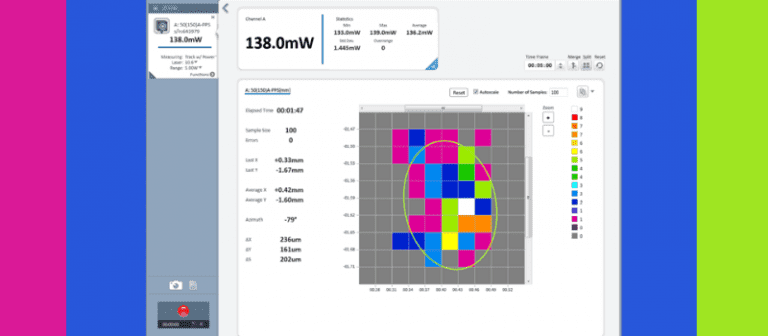
A particularly useful part of this workflow is the StarLab stability display. In this view, the sensor aperture is represented as a 10×10 grid, and each square is color-coded based on how often the beam centroid appears in that location over the course of the measurement.
As data builds, the display forms a pattern that gives users a quick visual picture of beam behavior rather than just a single numeric reading. This makes it easier to spot drift, directionality, and motion trends at a glance.
An ellipse also forms on the stability screen over time. Its orientation indicates the direction of the centroid’s motion, while its shape helps users interpret how that motion develops. The result is a richer view of beam pointing stability, presented alongside current readings for power, position, and, where supported, size.
A practical advantage during alignment
At first glance, a stability map may seem more complex than a standard numerical display. In practice, it can make alignment easier because users can see immediately whether an adjustment improves or degrades stability.
Instead of relying on isolated values, users get a more complete picture of what the beam is doing in real time. That can reduce guesswork, speed up troubleshooting, and make fine alignment more efficient.
Learn more about BeamTrack and StarLab
BeamTrack sensors and StarLab software can help simplify laser alignment and stability monitoring by bringing power, position, and stability data into one workflow.
Explore the BeamTrack and StarLab product pages to learn more and find the right configuration for your application.