
BeamGage Professional and BeamGage Enterprise allow programmers to access all the functionality of the graphical user interface through LabView, Visual Basic, C++ and C#. This video is a short introduction to automation with a LabView demonstration.
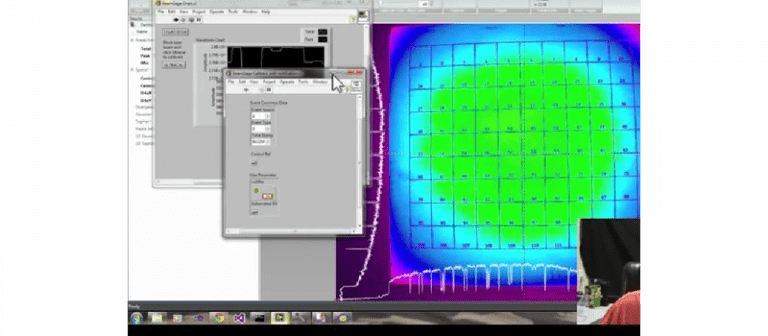
BeamGage Professional and BeamGage Enterprise allow programmers to access all the functionality of the graphical user interface through LabView, Visual Basic, C++ and C#. This video is a short introduction to automation with a LabView demonstration.



Hello, I am interested in same solution of application control by using Labview based on .NET technology but for LBP2 Series. Does this approach work with such type of laser profiler?
Hi Alexander,
Thanks for your question. I’m trying to find you an “official” answer. In the meantime, I can tell you that it doesn’t look too promising since the BeamGage manual has a whole section on automation, while the LBP2 manual is missing that section.
I’ll get back to you soon with the “full” answer. Sorry to keep you in suspense 🙂
To be continued…
Okay Alexander.
Sorry for the run-around, but I was informed that we don’t support the LBP2, so you’ll need to go through Newport (our parent company).
You can try filling out their technical support form: http://www.newport.com/tools/contactus/
I hope that helps!
Thank you for reply Effy. Does BeamGage Professional work with laser beam profiler – LBP2Series?
http://www.newport.com/CCD-Laser-Beam-Profilers/1028517/1033/info.aspx
I don’t think so Alexander, but I’m checking just to be sure.
Okay, I just got the full answer.
LBP2 is similar to Ophir’s “BeamMic” (basic software). The next level up is BeamGage Standard, and the highest level is BeamGage Professional. You can purchase an upgrade from LBP2 to either BGS (Standard) or BGP (Professional).
Here are the part numbers for those upgrades:
SP90406: LBP2 to BeamGage Standard Upgrade
SP90407: LBP2 to BeamGage Professional Upgrade
If you need automation, that’s one of the features that is available only in the professional version.
Let me know if you need anything else. Best of luck,
Effy
Effy! I just have sent request on price (sales@ophir-spiricon.com). Thanks!